Setting Up a Full Development Environment with Docker, CodeServer, MySQL, and Flutter
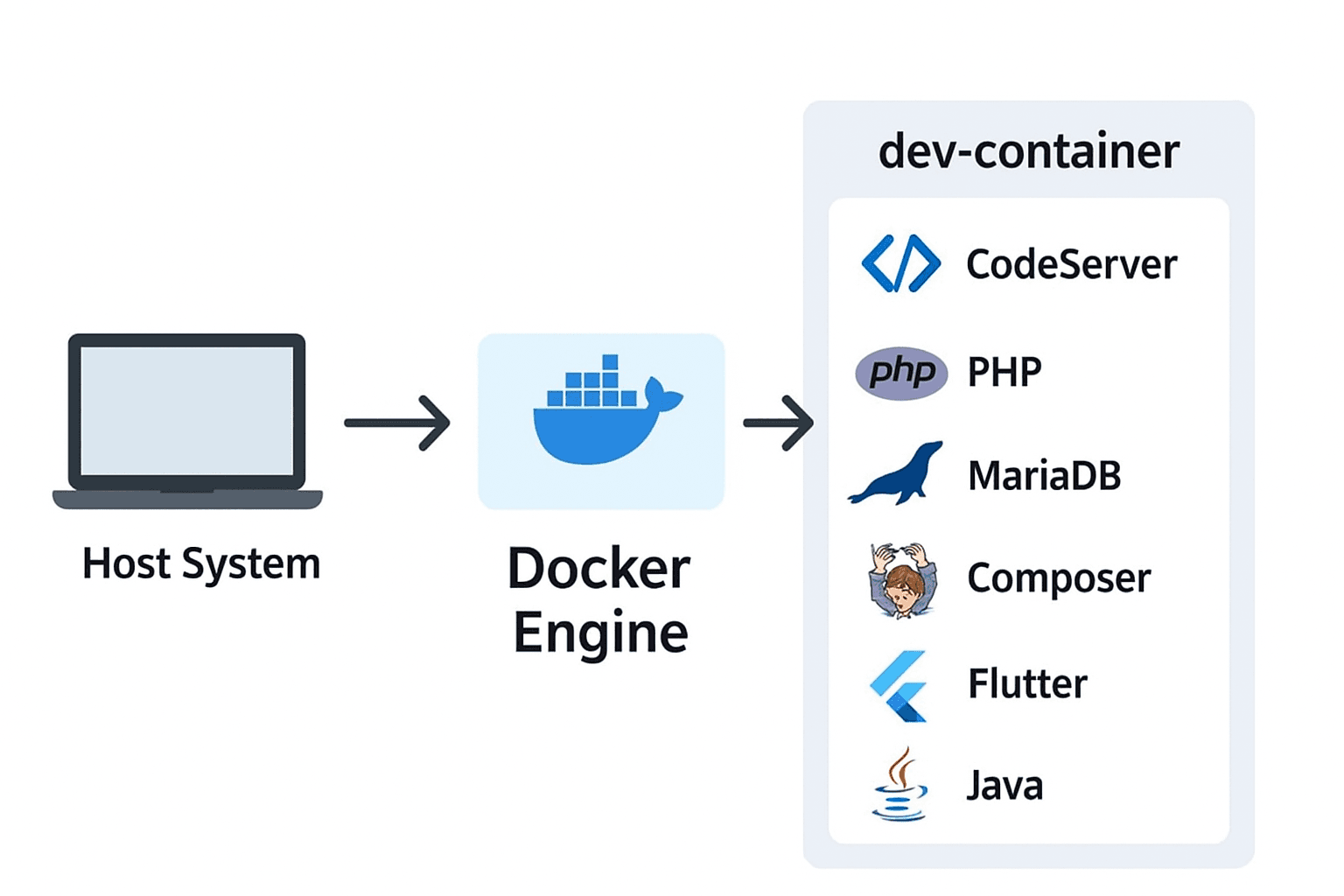
In this guide, I’ll walk you through how to set up a full-featured development environment using Docker. This setup includes Ubuntu 22.04, CodeServer (VS Code in the browser), MySQL, PHP, Composer, and Flutter — all running inside a single container.
Full Development Environment with Docker, CodeServer, MySQL, and Flutter
In this guide, I’ll walk you through how to set up a full-featured development environment using Docker. This setup includes Ubuntu 22.04, CodeServer (VS Code in the browser), MySQL, PHP, Composer, and Flutter — all running inside a single container.
Why This Setup?
Developers often face challenges like:
This Docker setup solves all of that by running a portable development container. You can connect to CodeServer via the browser, use MySQL, and even develop Flutter apps without polluting your host system.
Docker Compose File
Here’s the Docker Compose file that orchestrates the container:
version: "3.9"

services:
  dev-container:
    build: ./
    container_name: dev-container
    environment:
      TZ: Asia/Singapore
      DEV_PASSWORD: ChangeDevPassword123!
      CODESERVER_PASSWORD: ChangePassword123!
    ports:
      - "8443:8443"
    volumes:
      - /volume1/Kumar/Development:/home/dev/projects
      - codeserver-data:/home/dev/.local/share/code-server
    restart: unless-stopped

  db:
    image: mariadb:10.11
    container_name: db
    environment:
      MYSQL_ROOT_PASSWORD: ChangeRootPassword123!
      MYSQL_DATABASE: synodb
      MYSQL_USER: synouser
      MYSQL_PASSWORD: ChangePassword123!
      TZ: Asia/Singapore
    ports:
      - "3306:3306"
    volumes:
      - mysql-data:/var/lib/mysql
    restart: unless-stopped

volumes:
  codeserver-data:
  mysql-data:
Key Points:
Dockerfile
The Dockerfile sets up the environment inside the container:
FROM ubuntu:latest

ENV DEBIAN_FRONTEND=noninteractive
ENV TZ=Asia/Singapore

# Install dependencies
RUN apt-get update && apt-get install -y     curl     git     unzip     zip     sudo     software-properties-common     build-essential     php-cli     php-mysql     composer     openjdk-11-jdk     bash     locales     && locale-gen en_US.UTF-8     && apt-get clean

# Install Flutter
RUN git clone https://github.com/flutter/flutter.git /opt/flutter -b stable
ENV PATH="$PATH:/opt/flutter/bin:/opt/flutter/bin/cache/dart-sdk/bin"

# Install CodeServer
RUN curl -fsSL https://code-server.dev/install.sh | sh

# Create dev user
RUN useradd -ms /bin/bash dev && adduser dev sudo

# Set working directory
WORKDIR /home/dev

# ADD ENTRYPOINT SCRIPT
COPY entrypoint.sh /entrypoint.sh
RUN chmod +x /entrypoint.sh

# Expose CodeServer port
EXPOSE 8443

# Volumes
VOLUME ["/home/dev/projects", "/home/dev/.local/share/code-server"]

ENTRYPOINT ["/entrypoint.sh"]

# Start CodeServer as dev user
CMD ["sudo", "-u", "dev", "code-server", "--bind-addr", "0.0.0.0:8443", "/home/dev/projects"]
Entrypoint
The Entrypoint sets up the password for code-server inside the container:
#!/bin/bash
set -e

# 1 Set dev password from environment variable
if [ -n "$DEV_PASSWORD" ]; then
    echo "dev:${DEV_PASSWORD}" | chpasswd
fi

# 2 Generate Code-Server config.yaml
mkdir -p /home/dev/.config/code-server
cat <<EOF > /home/dev/.config/code-server/config.yaml
bind-addr: 0.0.0.0:8443
auth: password
password: ${CODESERVER_PASSWORD}
cert: false
EOF
chown -R dev:dev /home/dev/.config

# 3 Run Code-Server
exec "$@"
Key Points:
PHP, Composer for backend development.MariaDB (MySQL) for database.Flutter for mobile/web development.Java for Flutter or Android builds.dev user to avoid running everything as root.dev user.Running the Development Environment
Build the container:
docker-compose buildStart the container:
docker-compose up -dAccess CodeServer:
https://localhost:8443Use the password from CODESERVER_PASSWORD environment variable (ChangePassword123! in this case).
Connect to MySQL:
mysql -h 127.0.0.1 -P 3306 -u synouser -pPassword is ChangePassword123!.
Benefits of This Setup
Conclusion
With this Docker-based development environment, you can streamline your workflow, avoid local machine dependency conflicts, and start coding immediately in a fully configured environment. Whether you’re building web applications with PHP, managing databases with MySQL, or creating mobile apps with Flutter, this setup provides a portable, consistent, and easy-to-maintain workspace.
By leveraging Docker, CodeServer, and persistent volumes, your projects, IDE settings, and databases remain safe and accessible across sessions and devices. This approach is perfect for solo developers, teams, or anyone who wants a reliable, all-in-one development environment without cluttering their host system.